
Add Members · Reach out, at a pace that lasts
Add members to your Telegram group at a pace your account can keep
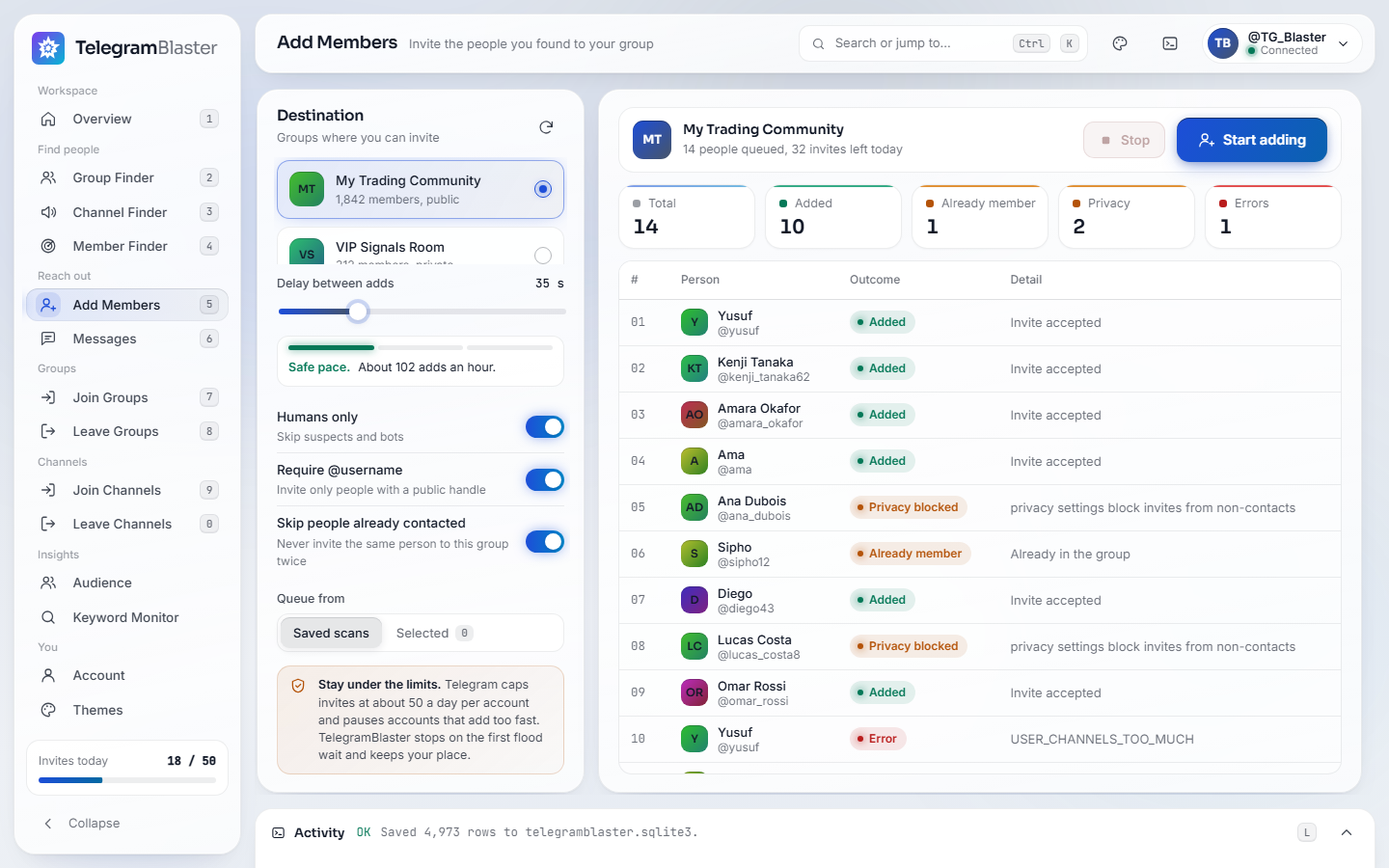
Add Members invites the people you extracted into a group you admin. They are added one at a time with a delay between each, only humans with a public username by default, and every row reports added, blocked by privacy settings, or failed. The app sets no daily limit: before each run a safety check shows the practices that keep an account healthy, and the run stops on the first flood wait.
01What it does
Add Members, in one window.
Invite the people you found into your own group.
Pick a group you admin and press Start. People are added one at a time with a delay between each, and every row reports added, blocked by privacy settings, or failed.
- A safety check with tips before every run
- Stops on the first flood wait instead of pushing through
- Only humans with a public username are eligible by default
- A Stop button ends a run at any point
02How it works
Four steps from start to result.
Pick your group
Choose a group where you are an admin who can invite people.
Choose who
Use the people you ticked in Member Finder, or everyone who matches from your saved scans.
Set the pace
Pick the delay between invites. The meter shows whether that is fast, moderate or a safe pace.
Read the safety check, then start
Proceed and the run starts at once. Stop and nothing is sent.
03Works with
Where Add Members hands its work.
The tools pass results to each other, so the output of one is the input of the next.
04Pricing
Every tool, one price.
One plan. Nothing held back.

$49per month
for each PC
One price for the whole suite, for each PC you run it on. No tiers, no add-ons, and no tool held back for a bigger plan. Try the three finders free first: 20 groups, 20 channels and 20 members.
Get the whole suiteNot ready to pay? Start with the free trial. Questions before you buy? support@telegramblaster.com
What you need
- A Windows PC
- A Telegram account
- API keys from my.telegram.org (free, about two minutes)
Everything in the suite 12
- Group Finder with 15 niches
- Channel Finder with similar-channel search
- Member Finder: members, authors, reactors, comments
- Activity filter and bot scoring
- Add Members with pacing and safety checks
- Messages: personalised sends, forward, copy, link collection
- Join and Leave for groups and channels
- Audience overlap and chat report cards
- Keyword Monitor
- Account status and profile editor
- CSV and JSON export, local database
- Five colour themes, command palette, number-key shortcuts
05Questions
Questions about Add Members.
Something not covered here? Write to support@telegramblaster.com.
How many people can I add in a day?
The app sets no daily limit: you choose the pace. Telegram applies its own limits per account, and fresh accounts are often held to around 20 a day, so a safety check before each run shows what keeps an account healthy.
Can it add people who block invites?
No. Privacy settings are respected. Those rows are marked and never retried.
What happens when Telegram says wait?
The run stops on the first flood wait instead of pushing through, and the wait is remembered on disk, so no tool sends that kind of request until it is over.
Will my account be safe?
No tool can promise that. A delay you choose, a safety check before every run, an automatic stop on the first flood wait and your own established account all lower the risk. Only invite or message people who expect to hear from you. Telegram's terms prohibit unsolicited adding and spam, and accounts that do it get restricted.
No question matches that. Try another word, or write to support@telegramblaster.com.